


With the Parimatch mobile app, the world of betting is yours!
How to download the app?
The official Android app you can download only from our website or via the link.
The iOS app you can download from the App Store, here is a link.
How to use the app?
At the bottom of the screen is a menu with 5 buttons.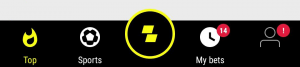
Using them, you can easily navigate the app. There are (from left to right):
1. «Top». Here you will find all the top matches in various sports: both the upcoming and live events. At the top of the screen, you will find special offers and buttons for navigating to other sections.
2. «Sports». Here you can find events that are being played right now. Bets are accepted and settled in real-time.
3. Main super button — With this button, you can navigate to additional tabs (such as search, favorites, loyalty program), to the main “Sports” menu with all the upcoming sports events, as well as to other sections for playing (virtual sports, casinos, slots, Live Casino, BetGames, TVBET).
4. «My bets», You can see settled bet and event outcomes in this tab, as well as pending bets.
5. «Personal account». Here you can check the balance, deposit your account, apply for withdrawal, check personal promotions, enter your data and upload documents for account verification, change the password, find contacts of a Customer Support team.
If you don’t remember your password, click on Forgot password and follow the instructions.
If the error “Access to the game account is restricted” occurs, please contact Parimatch Customer Support.
then to Personal Data -> Account Confirmation where you can find documents status and notes.
There are some procedures needed to be followed up, our department will check your documents, and if everything matches then they will verify you as soon as possible.
- Your account is still under verification and it's need a little more time to be processed
- You have an active bonus
- You may have an active welcome bonus
- You may have used a different withdrawal payment method(not the same as the method used to deposit funds)
- You did not use at least 70% from each deposit
Please try resolving such issues. If it doesn’t help, try reinstalling the Parimatch app.
- At the top of the screen, select the “Slots” or “Live Casino” category;
- Select the casino game you’re interested in;
- Follow the on-screen prompts to place the bet and launch the game.
If you activate in the full site, then you need to click " Checkout " and enter the promo code in the special field. It can be found in the Bonus Terms CA. But if you are activating from the mobile version or application, then first you need to go to "Promotion terms" and then click Get . After that, a window will appear cashier, where you need to make a transfer for the appropriate amount.
The refund can be due to getting into the handicap or total.
Or if in football a player did not start in the starting lineup, but the bet is on his individual total.
There can also be a return on tennis if the player refused. In this case, if the refusal was before the end of the first set, all bets, except for those which are actually played, are returned, and if the refusal after the end of at least one set, then the refund for all odds: for the match and for the sets. In this case, bets on a win are considered by the decision of the judge.
As soon as the processing is done, it will be credited to your account/wallet.